
AliSnapMedia has been installed successfully!

Thank you for choosing AliSnapMedia. Questions, or a product page that doesn't work? Contact support.

Please rate on the Chrome Web Store if AliSnapMedia saves you time — it helps other dropshippers find it.

How to download AliExpress images & videos

You're all set. Here's how to save every product photo and video from AliExpress in one click — it takes about 30 seconds.

  1. 1

    Pin AliSnapMedia

    Click the puzzle icon in the Chrome toolbar, then the pin next to AliSnapMedia so it's always one click away.

  2. 2

    Open an AliExpress product page

    Any listing works — AliExpress or Alibaba, on every country domain.

  3. 3

    Find the AliSnapMedia bar

    It appears above the product photos, showing every image and video it found on the page.
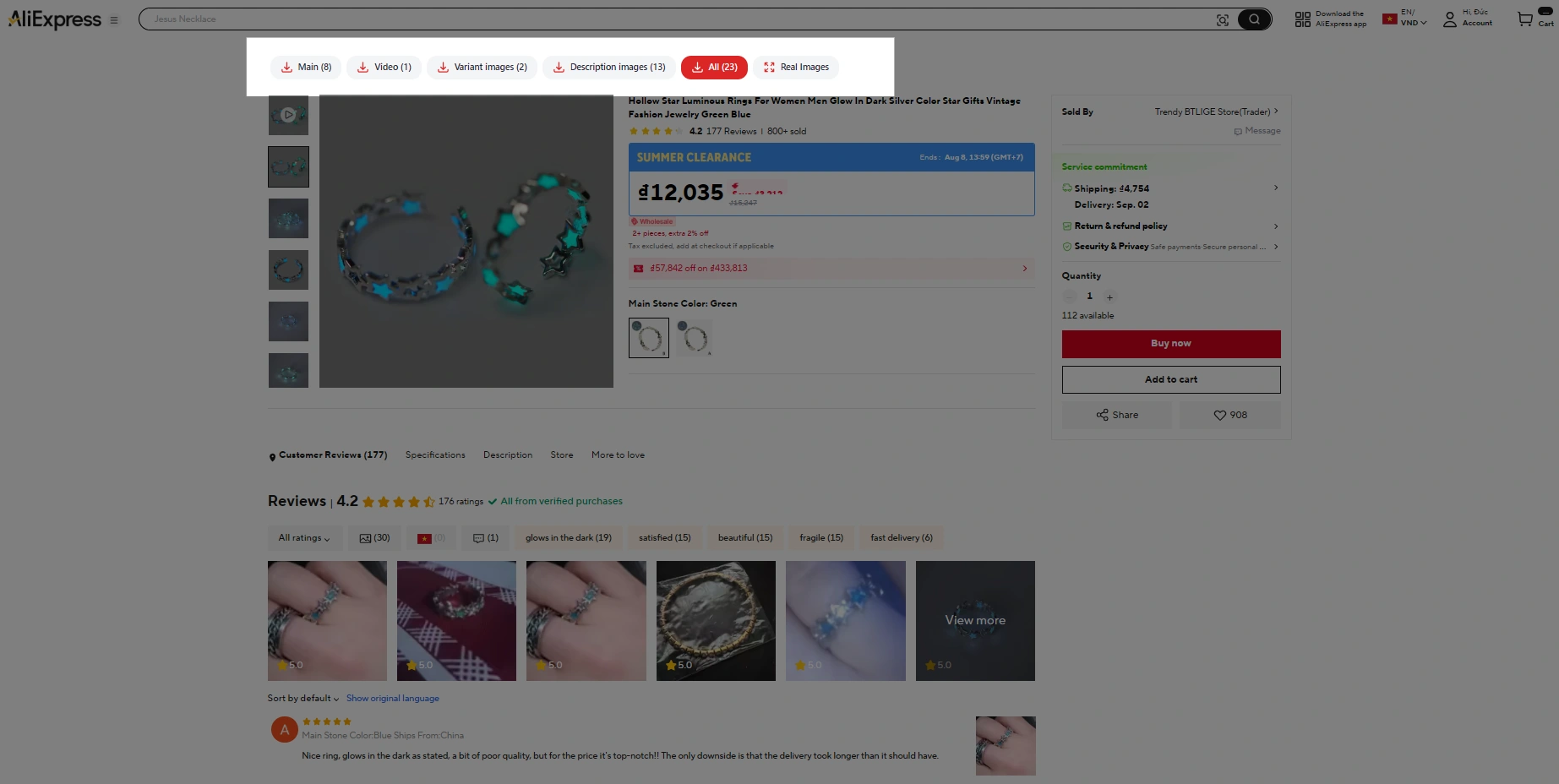
The AliSnapMedia bar above the photos on an AliExpress product page, with buttons for main images, video, variant images, description images and all
Your download buttons
  1. 4

    Click download — done

    Pick a tab (gallery, variants, description, video) or All. Files land in your Downloads folder, ready for your store.

** Works on AliExpress and Alibaba product pages.


What you can download with AliSnapMedia

Everything on the listing, sorted into folders and named in order — ready for bulk import.

  • Gallery photos at full resolution
  • Every variant photo — each colour and size
  • Description images most people never scroll to
  • Product video as H.264 MP4, no watermark
  • One ZIP for the whole media set

Why product media matters for your dropshipping store

Shoppers can't touch the product, so photos and video do the selling. Clean, complete media makes your listing look trustworthy, gives every variant the right image, and hands you ready-made creative for TikTok and Facebook ads — without hours of right-click-and-rename.


Quick answers

Is AliSnapMedia free?

Yes — every feature, no account, no daily limit.

Where do the files go?

Your browser's Downloads folder, grouped by type.

The button doesn't show up?

Refresh the product page once. Still nothing? Contact support and send us the link.

Do I need an AliExpress account?

No. Just open a product page and click download.

Ready? Grab your first product.

Open AliExpress

Productivity Chrome Extension for AliExpress Dropshippers

AliSnapMedia – Download AliExpress Images and Videos

1-click Chrome extension for dropshippers to download AliExpress product images & videos in high resolution.

Install NowOfficially on Chrome Store

Free for dropshippers · No account · Runs locally in your browser

Why Choose AliSnapMedia – The Best AliExpress Downloader for Dropshippers?

Every winning product needs great product media. AliSnapMedia is a fast, free AliExpress image downloader and video saver built for dropshippers: one click saves every product photo, variant swatch, description image and product video in high resolution — ready to upload to Shopify, WooCommerce or any store.

Powerful Features of AliSnapMedia

AliSnapMedia is more than an AliExpress image downloader. It gives dropshippers and online sellers everything they need to list products faster and sell more.

Download AliExpress Images

Full-resolution product photos, ready for your store listings and ads.

Download AliExpress Videos

HD product videos as MP4 — perfect for TikTok, Facebook ads and product pages. No watermark.

Variant Photo Downloader

Every colour and size photo, so each variant in your store shows the right image.

Description Image Downloader

The detail images sellers bury in the description — great for building your own product page.

Bulk Download as ZIP

Save a product's whole media set as one ZIP and import it straight into your store.

Unlimited & Free Downloads

Research and list as many winning products as you like — no cap, no account.

Get ready to scale your AliExpress dropshipping store!

1 clickto a full product media set
Unlimitedproducts, no daily cap
Fast & easystore setup

Save time for your Dropshipping Business

Spend your time finding winning products — not right-clicking images one by one.

1

Install the extension

Add AliSnapMedia from the Chrome Web Store — free, no account needed.

Install Now
2

Open a product page

Pick a winning product on any AliExpress or Alibaba listing.

3

Click download

Hit the on-page button, or the AliSnapMedia icon in your browser toolbar.

✓

Start selling

Upload the photos and video to your store and launch.

How many hours does your store lose to product images?

Drag the sliders to see what saving media by hand costs your dropshipping business each month.

40
5100200300
25
5305580
15s
5s18s31s45s

You get back

4.2
hours every month

That's 1,000 files a month you no longer right-click, rename and convert one at a time.

FAQs – AliExpress Image & Video Downloader

How do I download AliExpress images in bulk?

Install AliSnapMedia, open any AliExpress or Alibaba product page and click the download button. Every gallery photo, variation swatch and description image is saved in one go — or pick the ones you want and save them as a single ZIP.

Does AliSnapMedia download AliExpress videos?

Yes. If the listing has a product video, it comes down as a standard H.264 MP4 alongside the images, with no watermark added.

Can I use AliSnapMedia for Shopify dropshipping?

Yes. The photos and videos are saved as standard JPG, PNG and MP4 files, so you can upload them to Shopify — or WooCommerce, Wix or any other store — like any other product media. The extension doesn't connect to your store directly.

Is AliSnapMedia free?

Yes. Every feature works without payment or an account, there's no daily limit, and there's no trial that expires.

Is the AliSnapMedia extension safe?

It's published on the Chrome Web Store and runs entirely in your browser. It only reads the product page you're on to find the media, never asks for your AliExpress or Alibaba login, and sends nothing to a server. Details are in the privacy policy.

Will it work on Edge, Brave or Opera?

Yes. Any Chromium browser that installs from the Chrome Web Store will run it.

Does it work on Alibaba too?

Yes. AliSnapMedia works on AliExpress and Alibaba product pages, across every country domain.

Can I publish these images on my own store?

The extension gives you the files. Whether you may republish a given supplier's photos depends on your agreement with that supplier, so check before you list.

Stop right-clicking. Start selling.

Install once and list your next winning product in minutes, not hours.

Install NowOfficially on Chrome Store
Add to Chrome — free